How to Handle Drop-shipping Orders
I. Introduction
Definition of Drop-shipping Order: An order that contains products requiring drop-shipping by the supplier (i.e., distributed products) is a drop-shipping order. This indicates that it needs to be pushed to the supplier for fulfillment.:https://www.yuque.com/lingtongdadan/box4vd/nv6rvbo1s7g269ub
II. Order Inquiry:
- When an order contains distributed products, it will be marked with a Drop-shipping tag. Drop-shipping orders are in the same order pool as other orders and are not separated.
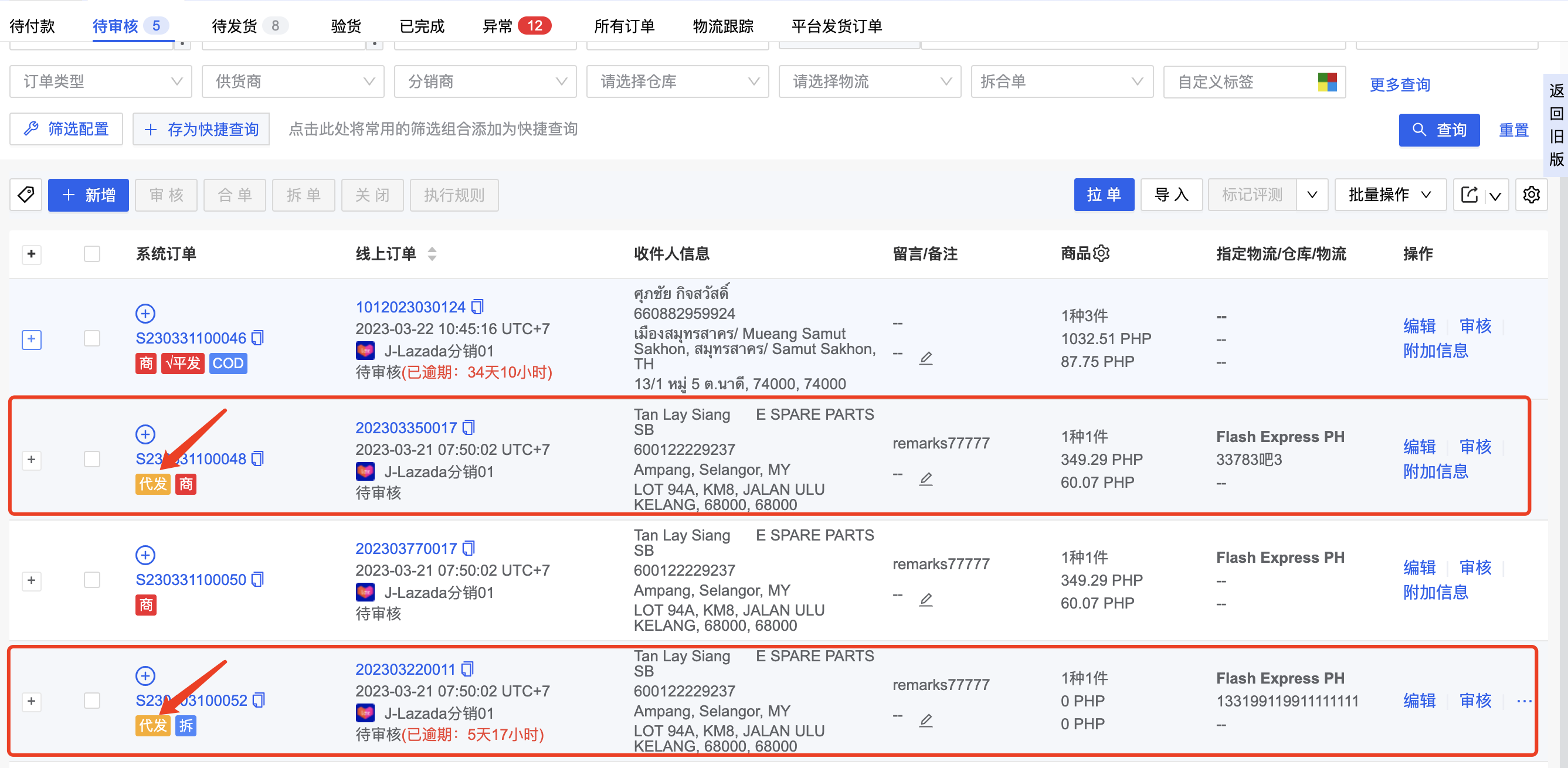
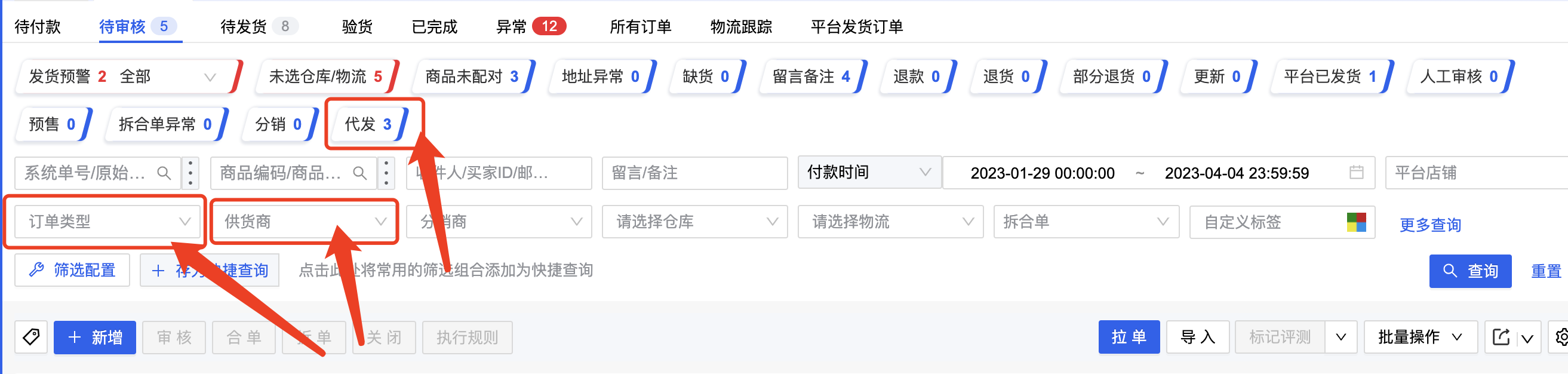
- You can filter drop-shipping orders using the Order Type filter; you can also query orders that need to be pushed to different suppliers. The statistical tags at the top of the page will automatically include statistics for drop-shipping orders.
- For drop-shipping orders on the pending review page, the specified warehouse will display the name of the corresponding supplier for that order.
III. Order Review
The review process is the same as for regular orders. After review, the order will move to the pending shipment page. The differences are:
- Drop-shipping orders need to be pushed to the supplier for shipment. During review, if a drop-shipping order contains distributed products from different suppliers, it must first be split by supplier.
-
Drop-shipping orders support platform shipping label retrieval, system shipping label retrieval, and supplier logistics for shipping. Please choose the shipping method based on the actual situation:
Platform Logistics: The order uses platform logistics (e.g., Shopee pickup). The distributor obtains the tracking number and shipping label from the platform and then sends them to the supplier.
System Logistics: During order review, select a logistics provider directly integrated with Qianyi (e.g., BEST, J&T). The distributor obtains the tracking number and shipping label through Qianyi from these 3PLs and then sends them to the supplier.
Supplier Logistics for Shipping: This means shipping is included/handled by the supplier. The supplier arranges shipment with their own partnered logistics provider.
- When a drop-shipping order is reviewed and sent to the supplier, an additional check will be performed to verify if the distribution wallet balance is sufficient and if the distributed product inventory is sufficient. The distributed product inventory is entirely synchronized based on the supplier's product inventory quantity (synchronized every 3 minutes). Modifications by the distributor are currently not supported. (You can view the current distributed product inventory in the I am the distributor - Products I Distribute menu.)
For example:
A supplier has 100 units of Product A in their warehouse. They synchronize the distributed product inventory quantity to all distributors as 100 units.
Distributor 1 first reviews and sends an order for 40 units of Product A to the supplier. After successful review, 40 units of the supplier's distributed product are occupied, and the available quantity becomes 60 units. This synchronized distributed product inventory quantity for all distributors then becomes 60 units.
When Distributor 2 subsequently reviews and sends an order to the supplier, if the order quantity exceeds 60 units, the review will fail due to insufficient inventory.
- After a drop-shipping order is successfully sent to the supplier, if you wish to withdraw the order, you can click the Re-review button. If the re-review is successful, the order already sent to the supplier will be closed, and the wallet balance will be released.
IV. Order Shipping Feedback
After pushing the order to the supplier, the next step is to wait for shipment. When the supplier ships the order, feedback will be sent to the distributor, and the drop-shipping order status will change to Shipped.
If you are sure the supplier has shipped this order, but the order status hasn't updated, you can also manually mark the system order as shipped.
If Supplier Logistics for Shipping was used, after the supplier ships, the carrier and tracking number will also be synchronized back to the distributor and can be displayed in the pending orders list.
Q&A
1. What should I do if a drop-shipping order has a Product tag?
The Product tag indicates a product abnormality. This could be due to an unmatched online product in the order or a deactivated distributed product. You can click into the order details to see the specific reason. If a distributed product is deactivated, the order cannot be reviewed. You can contact the supplier to reactivate the product and then Update Order Items, or replace it with a normal product. The Product tag will then be automatically cleared.
2. What should I do if a drop-shipping order has a Shipment Failed tag?
Shipment Failed means the supplier closed the order in their system. You need to communicate with the supplier to understand the reason.
If you determine that this supplier still needs to ship the order, you can ask the supplier to re-review the order, or after the supplier ships offline, you can manually mark the system order as shipped.
If you no longer need this supplier to ship the order, the distributor can withdraw the order for re-review and decide whether to replace the order items with a different supplier or directly close the order and contact the buyer for a refund.
3. Why can't I see drop-shipping orders when I log in to Qianyi ERP?
It may be that your account does not have permission. You can ask the main account to grant your account supplier permissions in System → Permissions Management → User Management.
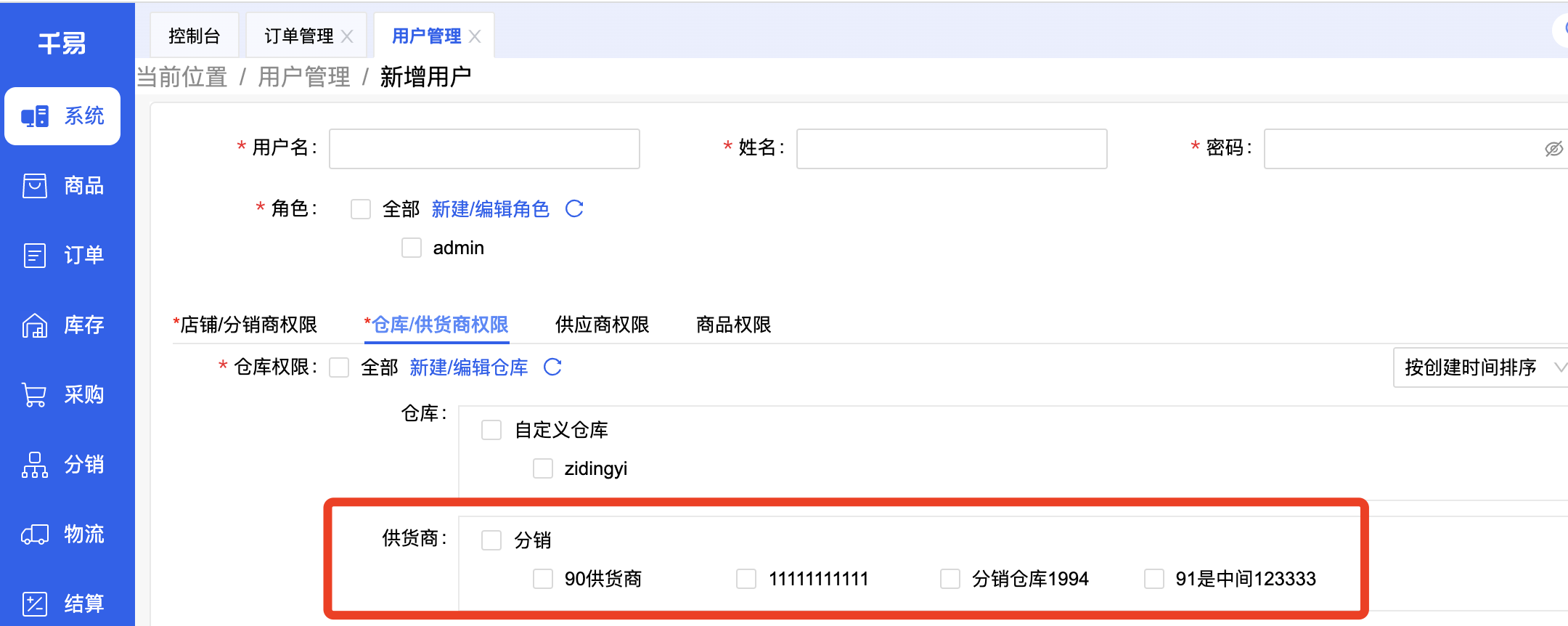
If even the main account cannot see them, it might be because the Qianyi version you registered for does not support the distribution business. You will need to contact sales or your account manager to activate it.
4. Besides platform orders, I also have some offline orders that need to be shipped by my supplier. How should I handle these?
Qianyi now supports manual drop-shipping orders! You can create a manual order, add the distributed products from this supplier, and during review, choose either system-integrated logistics or let the supplier decide the shipping method.
5. An order of mine contains multiple products, and these products are shipped by different suppliers. How should I handle this?
For platforms that support order splitting, you need to split the order in the platform backend first and then synchronize the orders, or split the order by supplier in Qianyi and then provide feedback to the platform. Afterwards, obtain shipping labels for each sub-order separately and then push them to the respective suppliers.
If the platform does not support order splitting, you can split the order in Qianyi first and then push the separate orders to the respective suppliers.