How to Handle Distribution Orders
I. Introduction
Definition of Distribution Order: Orders pushed by cooperating distributors are called distribution orders.
II. Order Inquiry
1. When a downstream distributor pushes a distribution order, if the supplier's inventory is insufficient, the distributor's wallet balance is insufficient, or the distributed product is deactivated, the push will fail. Once the push is successful, a pending review order is generated within the supplier's system, and the distributor's wallet balance will be frozen.
2. Distribution orders will be marked with a Distribution tag. No matter how the order details are changed or edited, the order source will not change, and the Distribution tag will remain.

3. The product amount for a distribution order is the supply price of the distributed product at the time the distributor pushes the order. The shipping cost defaults to 0.
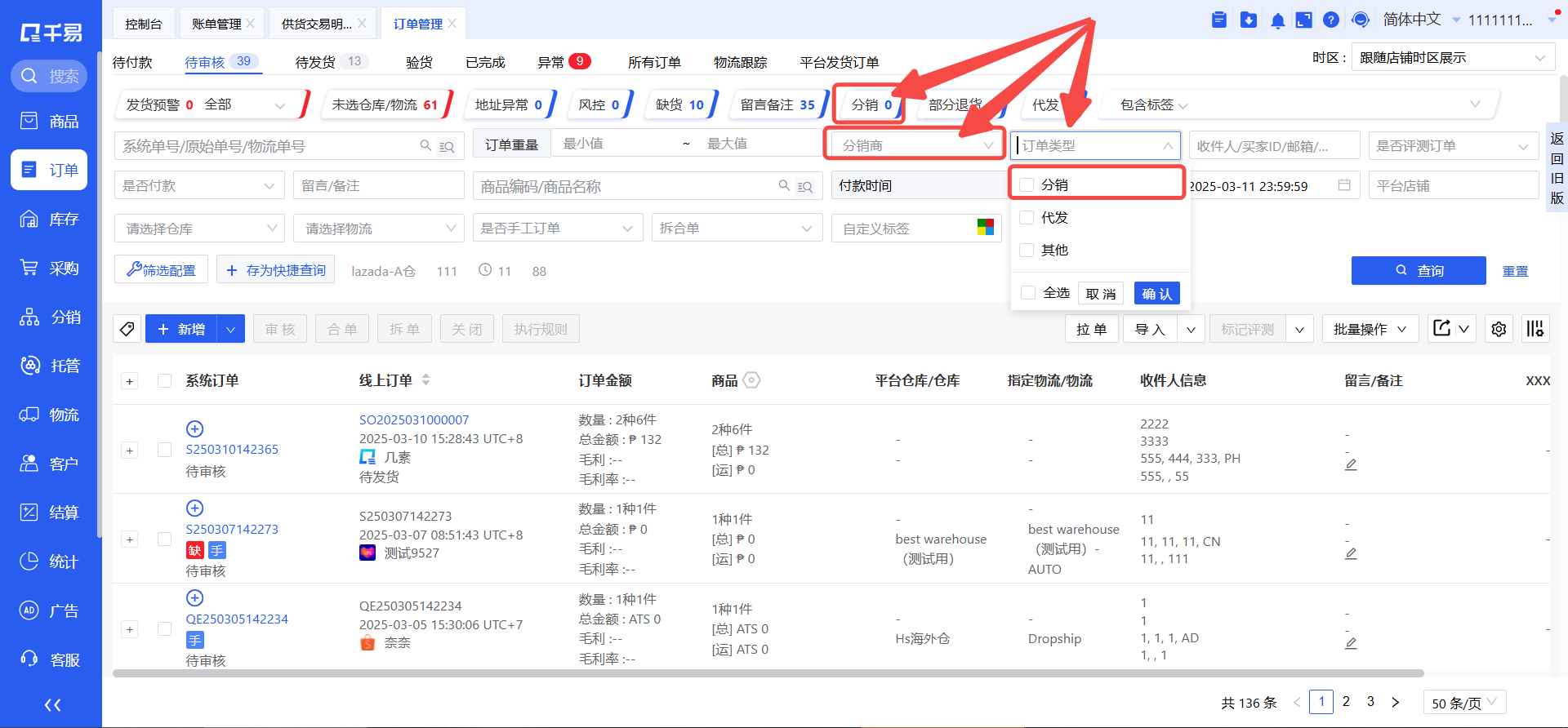
4. You can filter distribution orders using the Order Type filter; you can also query orders pushed by different distributors. The statistical tags at the top of the page will automatically include statistics for distribution orders.
5. For a pending review distribution order, if the distributor has obtained a tracking number and shipping label and pushed it over, the specified shipping method will display the logistics chosen by the distributor, making it convenient for the supplier to handle the shipment.
If the supplier provides their own shipping method and the distributor selects Supplier Logistics for Shipping when reviewing, then when the distribution order is pending review, the buyer's specified shipping method will display Supplier Logistics for Shipping.
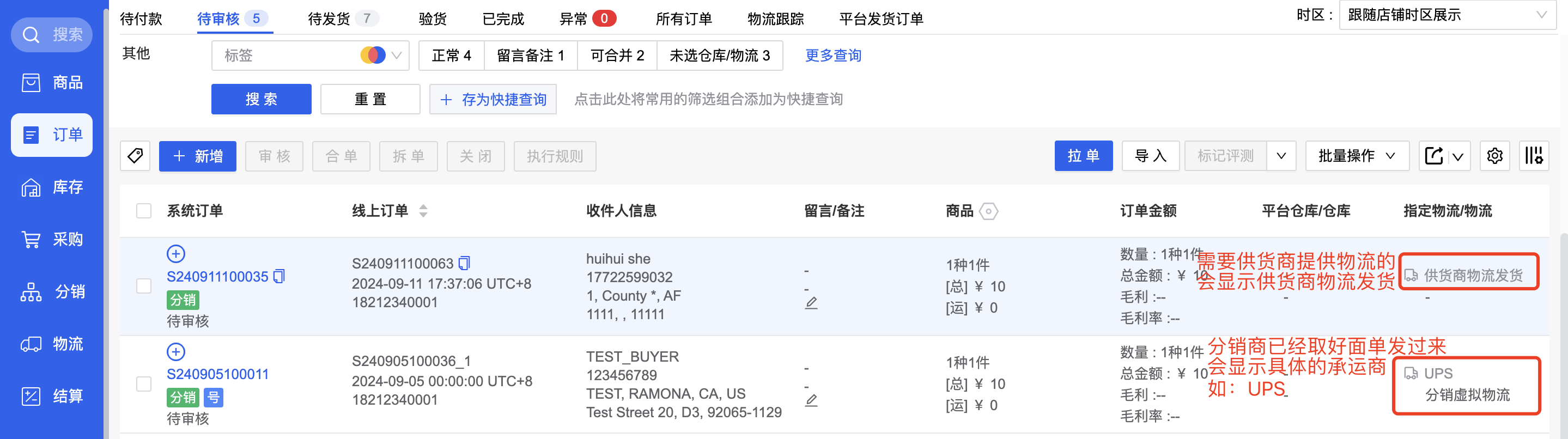
When reviewing such orders, the process is the same as for regular orders. Simply select the warehouse and shipping method, and proceed with the normal review and shipment process.
6. Distribution orders cannot be split or combined for now.
III. Order Review
1. When a distributor pushes an order, they can either obtain a tracking number and shipping label in advance from a carrier partnered with the platform or the distributor and push it over, or they can select Supplier Logistics for Shipping and push it over.
(1) If the shipping information (carrier + tracking number + label) for the distribution order is provided by the distributor, the supplier does not need to select a shipping method and obtain a number themselves during review. Depending on the warehouse type selected during review:
If the supplier uses a custom warehouse, the shipping method will directly display the logistics chosen by the distributor, and no additional processing is needed.

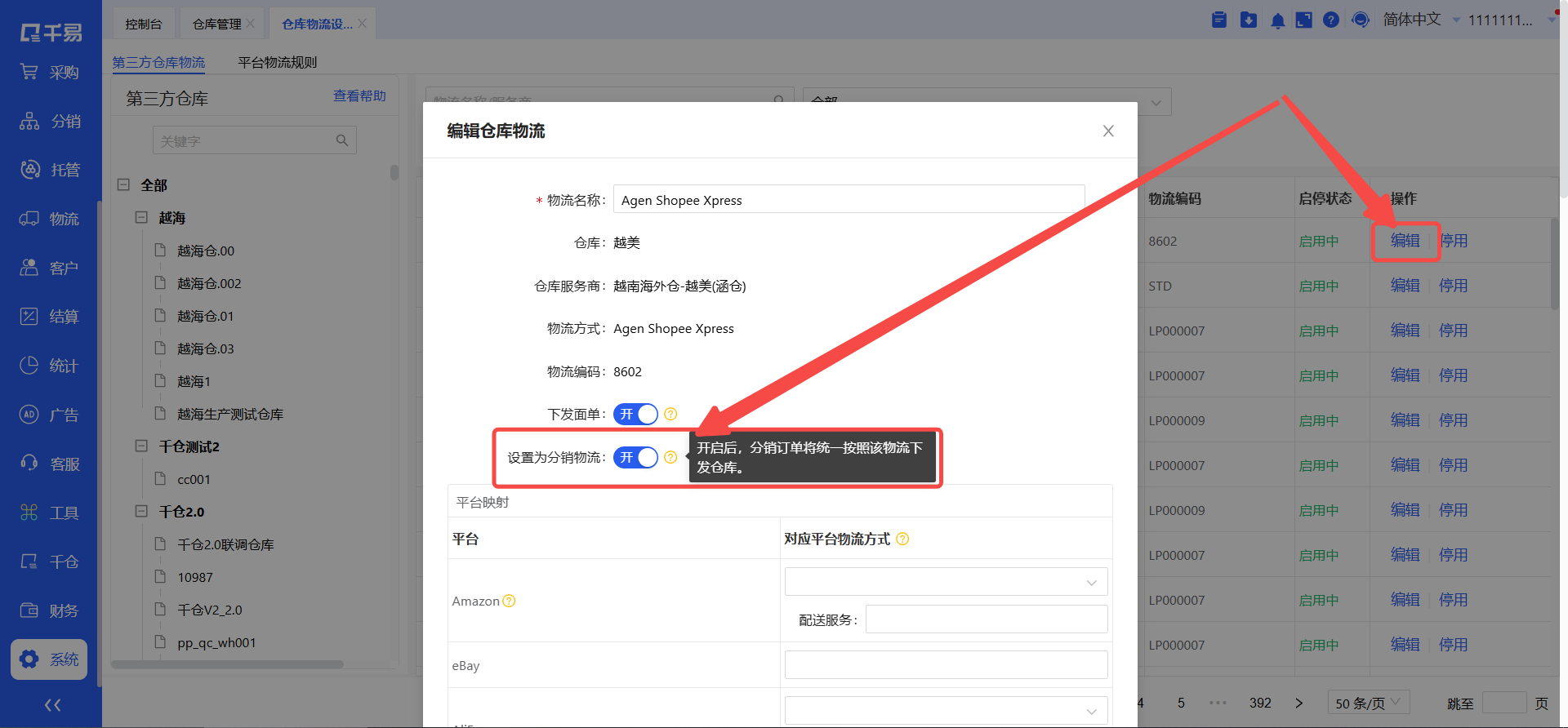
If the supplier uses a third-party warehouse, because some third-party warehouse systems have their own specified shipping methods, the ERP must use this shipping method to successfully send the order. Therefore, the supplier and the warehouse need to agree in advance that a particular shipping method is specifically for receiving distribution orders. The supplier must also maintain this distribution logistics corresponding to the third-party warehouse in the ERP in advance so that this shipping method can be selected during review for sending the order.
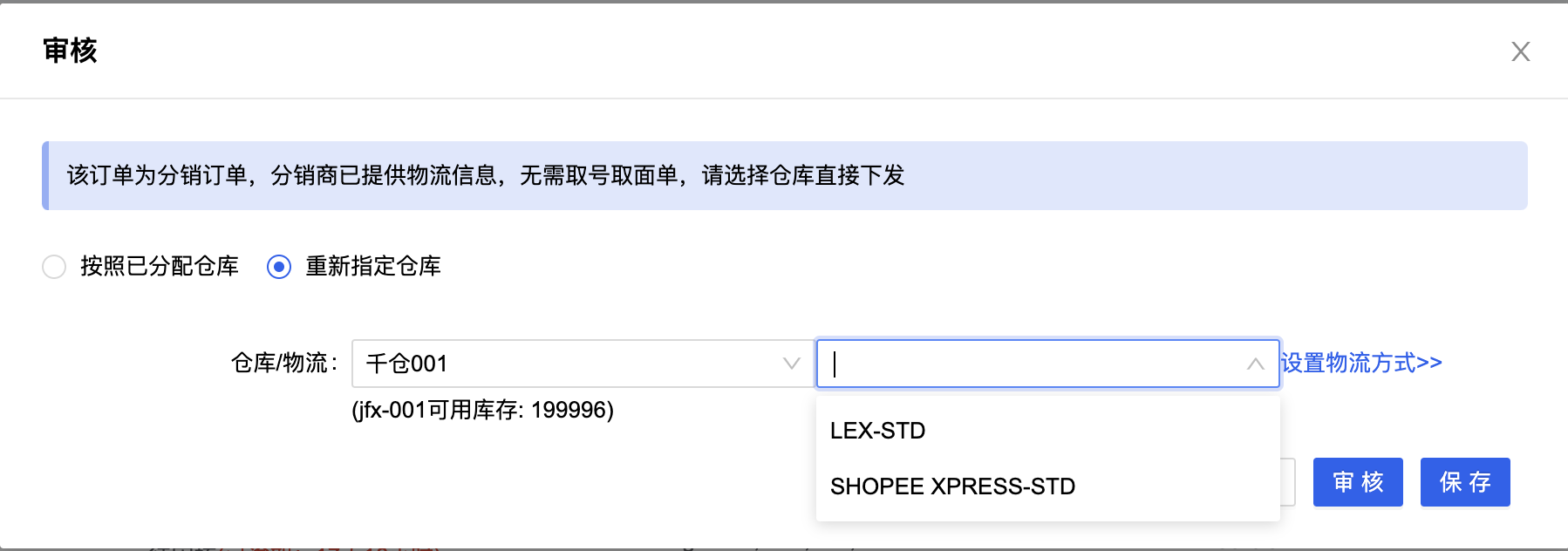
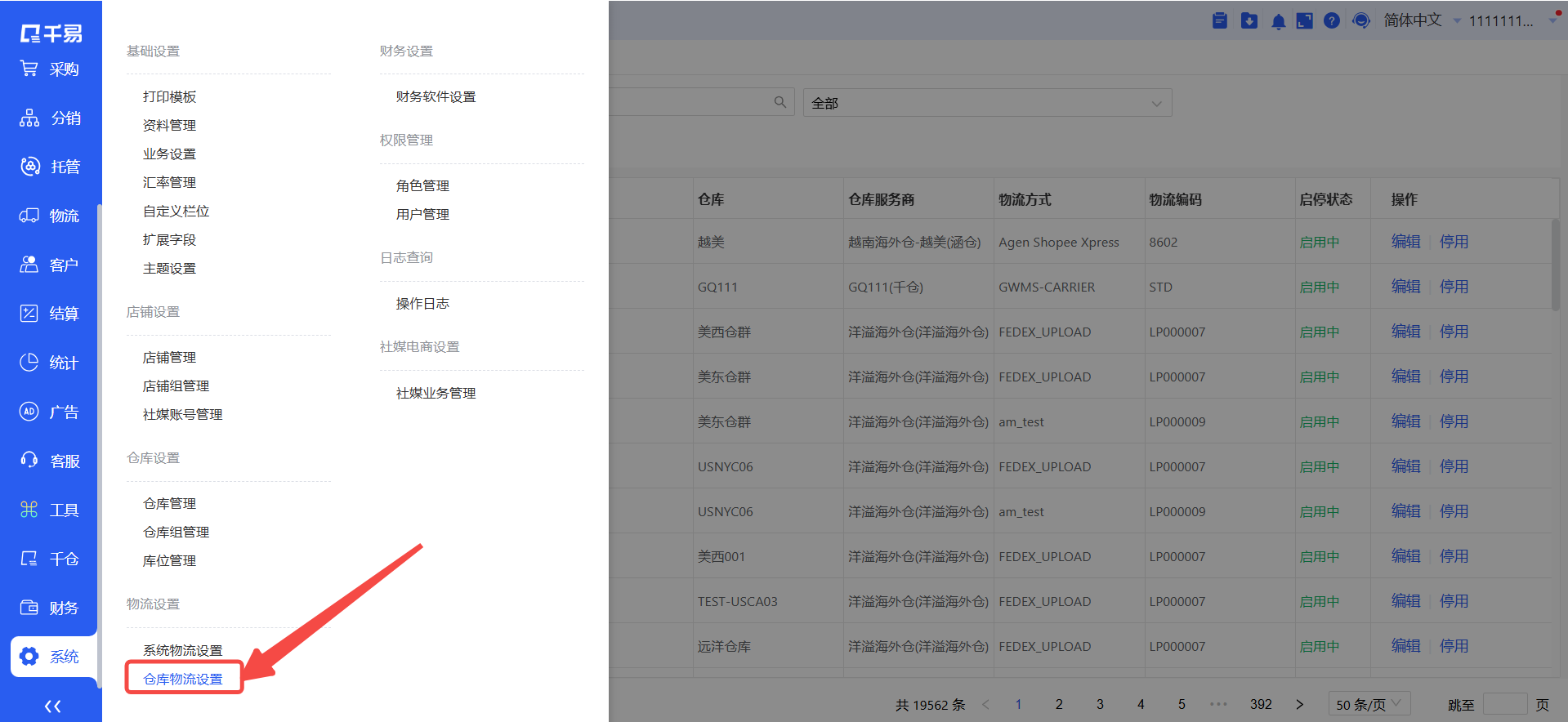
As shown in the image above, LEX-STD and SHOPEE EXPRESS-STD are both shipping methods pre-set as distribution logistics in System → Logistics → Third-party Warehouse Logistics.
(2) If the distributor selects Supplier Logistics for Shipping during review, then when the order is pending review, the buyer's specified shipping method will display Supplier Logistics for Shipping.

When reviewing such orders, the process is the same as for regular orders. Simply select the warehouse and shipping method, and proceed with the normal review and shipment process.
2. Re-review. If the distributor withdraws a distribution order for re-review, the supplier's order will be directly closed, and the distributor's wallet balance will be released. When the distributor pushes this order again, it will be pushed with a suffix -1/2/3/n added to the original order number.
IV. Shipping Feedback
When the warehouse ships successfully and the status of the distribution order changes to Completed, a notification of shipment will be sent to the distributor, and the distributor's wallet balance will be directly deducted. In the Completed status, the distributor cannot withdraw the order for re-review.
If Supplier Logistics for Shipping is used, the carrier and tracking number will be sent to the distributor upon successful shipment.
Q&A
1. If I am a first-tier middleman distributor, sourcing products from my supplier while also having downstream second-tier distributors, how should orders be handled?
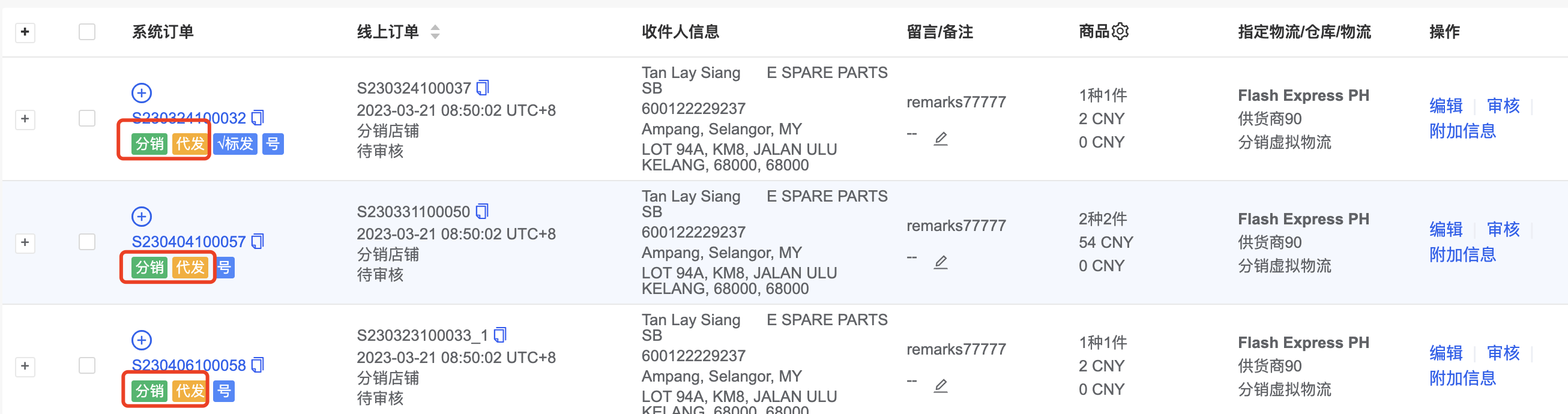
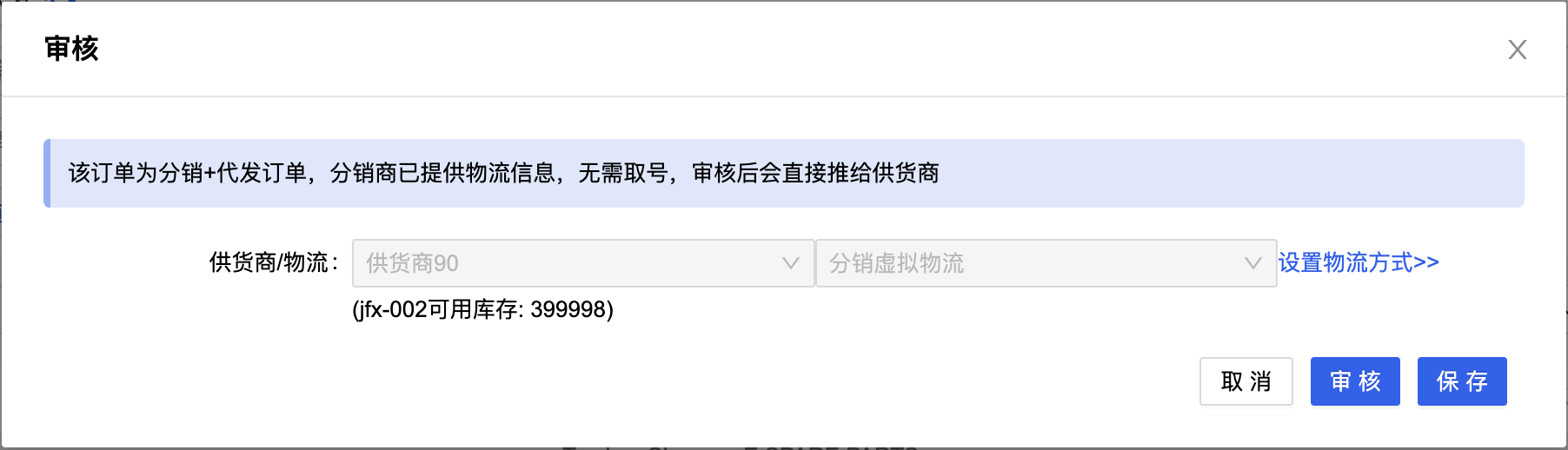
Second-tier distributors open stores on the platform, and you are their supplier. After they obtain a tracking number and shipping label, they push the order to you. This order is your distribution order. Simultaneously, because the products in this order need to be shipped by your supplier, this order is also a drop-shipping order.
Therefore, for a first-tier middleman distributor, the order is both a distribution order and a drop-shipping order, and it follows the characteristics and processes of both order types. During review, there is no need to select a warehouse or shipping method. You can simply review and send it through; the system will handle it automatically.
2. Why can't I see the distribution orders pushed by distributors?
It may be that your account does not have permission. You can ask the main account to grant your account distributor permissions in System → Permissions Management → User Management.

If even the main account cannot see them, it might be because the Qianyi version you registered for does not support the distribution business. You will need to contact sales or your account manager to activate it.